KEY CAPABILITIES
What you can do with NetScaler ADC management and monitoring
3
transparent

Create jobs to make configuration changes, including upgrades across different ADC types
h2
text-link
new-tab
transparent

Monitor application performance and take corrective action when traffic-flow anomalies are detected
h2
text-link
auto
transparent

Create alerts for ADCs based on specific events and severity
h2
text-link
new-tab
transparent

Generate reports to see the mapping between ADCs and corresponding entities such as virtual servers, service groups, and services
h2
text-link
new-tab
transparent

Identify certificates that are unused or about to expire
h2
text-link
auto
transparent

Monitor HTTP and non-HTTP traffic via secure monitors built in to ADCs
h2
text-link
new-tab
KEY FEATURE
Monitoring security incidents
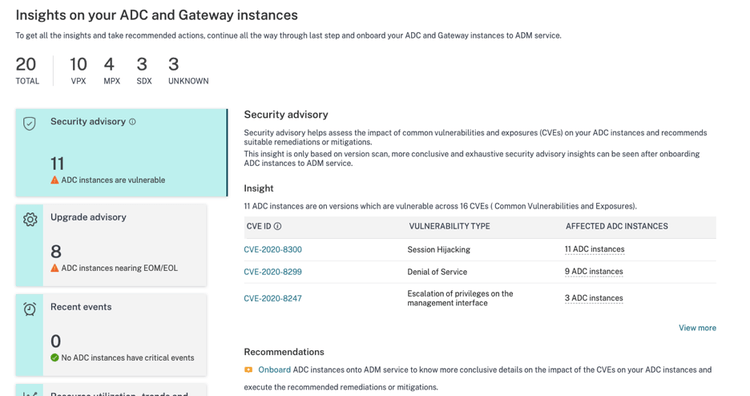
NetScaler ADC management and monitoring at a glance
3
transparent
Role-based dashboards
h3
Empower the right people with the right insights for the issues they care about most: Create custom dashboards to give ITOps a holistic view of applications and ADCs, SecOps a comprehensive view of all security details, and application owners a focused view of specific applications.
text-link
new-tab
transparent
Style books
h3
Use default templates called style books or use custom templates to create and manage ADC configurations. NetScaler saves every ADC configuration as a configuration pack that you can reuse with the same or different values. Each time you change the values, a new configuration pack is saved.
text-link
auto
transparent
SSL certificate management through a unified console
h3
NetScaler provides a unified console to automate the installation, updating, deletion, linking, and download of SSL certificates. Configure automated policies to ensure the recommended issuer, key strength, protocol, and algorithms according to your IT policies.
text-link
new-tab
transparent
Upgrade advisory
h3
NetScaler upgrade advisory helps you monitor the lifecycle of ADCs by flagging ADCs that are reaching or have reached EOL or EOM or that are not on the latest or preferred ADC build.
text-link
new-tab
transparent
Security advisory
h3
NetScaler security advisory highlights new common vulnerabilities and exposures (CVEs) and assesses the impact of CVEs on the infrastructure. It recommends mitigations and remediations that you can apply using NetScaler.
text-link
auto
transparent
Configuration jobs
h3
Use NetScaler to create jobs (a set of configuration commands) that ensure the proper replication of configuration changes, system upgrades, and other maintenance activities across all of your ADCs.
text-link
new-tab
Resources
3
white
A DevOps primer: Using style books to automate multi-cloud application delivery
h3
text-link
Read article
auto
Read article a DevOps primer: Using style books to automate multi-cloud application delivery - Opens link in a new window
white
Application delivery management overview
h3
text-link
Go to docs
auto
Go to docs application delivery management overview - Opens link in a new window