KEY CAPABILITIES
What you can do with NetScaler ADC management and monitoring
3
icon,transparent
large
Auto-scale ADCs in cloud environments to meet fluctuating demand
h3
text-link
new-tab
icon,transparent
large
Gain unparalleled scalability via clustering technology
h3
text-link
auto
icon,transparent
large
Auto-scale application servers and automatically add and remove resources
h3
text-link
new-tab
icon,transparent
large
Automate CDN scalability to scale content delivery and minimize costs
h3
text-link
new-tab
icon,transparent
large
Cluster 32 NetScaler hardware devices to achieve up to 6.4 Tbps L7 throughput
h3
text-link
auto
icon,transparent
large
Cluster virtual devices to achieve up to 3.2 Tbps L7 throughput
h3
text-link
new-tab
KEY FEATURE
Configure auto-scale parameters
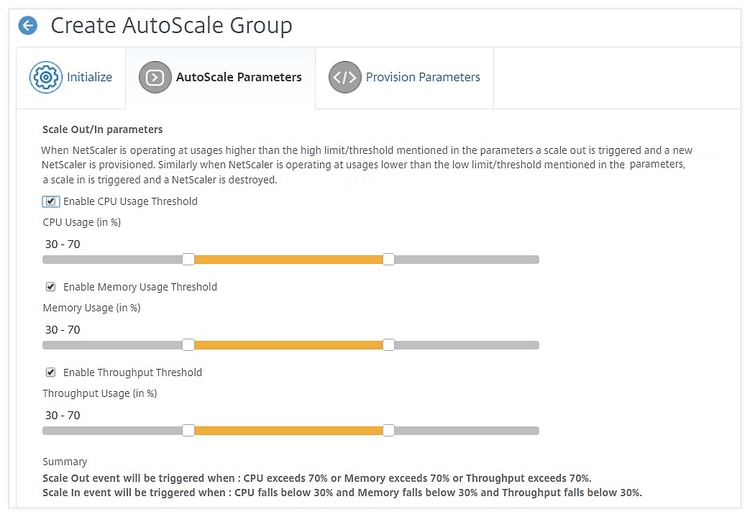
How NetScaler dynamic scaling is different
3
transparent
Backend servers
h3
NetScaler adds backend servers to the load balancing pool as soon as they are started so that they can start to process requests with no further intervention.
text-link
new-tab
transparent
Efficient clustering
h3
By adding more NetScaler hardware ADCs to an existing cluster for horizontal scaling, you achieve huge throughput for a single IP and port across multiple hardware appliances simultaneously. Other vendors only offer “pseudo scaling” where they use one IP on one box and a different IP on another.
text-link
auto
transparent
Auto-scaling and cost transparency in public cloud
h3
With NetScaler, you can prevent a “success disaster” caused by unexpected demand on an application built for tens of requests per day that must suddenly handle millions of requests per hour. NetScaler automatically deploys a fully configured auto-scaling front-end in AWS or Azure in your VPC and provides complete visibility into costs.
text-link
new-tab
Resources
2
white
Tech paper: Best practices for Citrix ADC Deployments
h3
text-link
Read article
Read article tech paper: Best practices for Citrix ADC Deployments - Opens link in a new window